Process
How the YotoShelf logo was created: tools, prompts, decisions, and the tracing workflow.
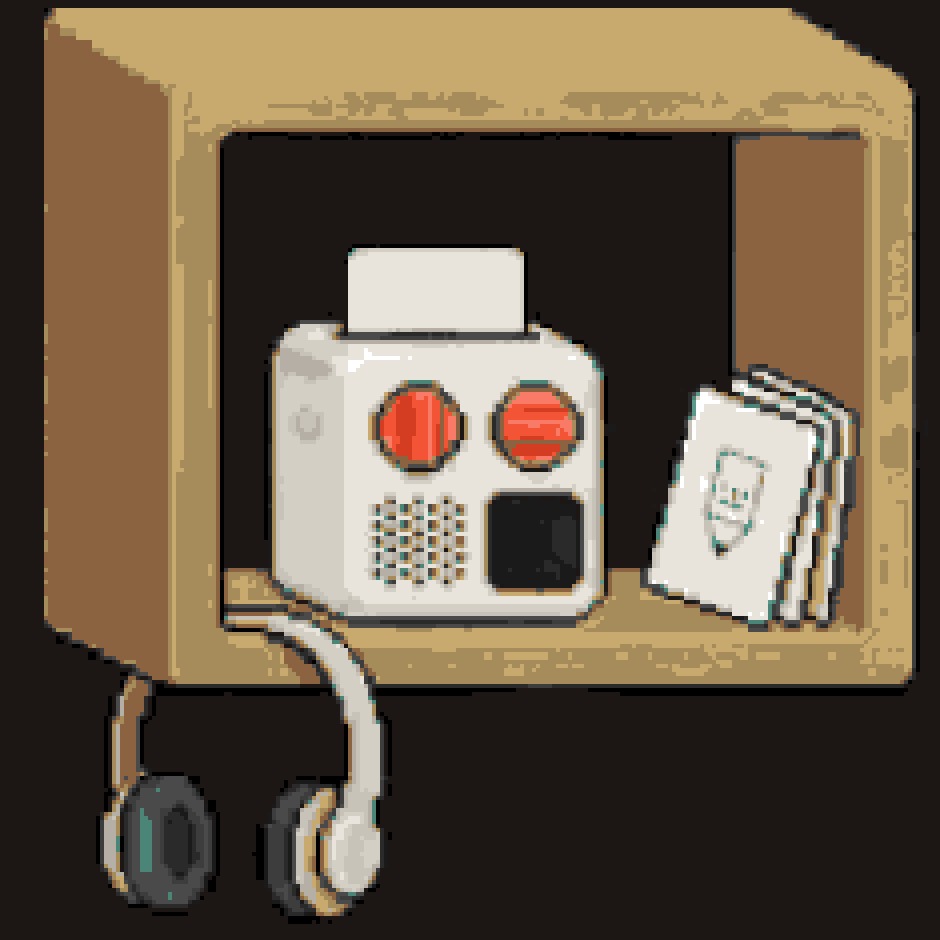
The logo is a pixel-art scene depicting Yoto audio players, headphones, and cards on wooden shelves. It comes in two formats: a 1:1 mark (a single cozy home shelf, croppable as an avatar) and a 3:1 hero (three staggered shelves connected by glowing orange network lines with cards in transit).
Tools
| Tool | Purpose |
|---|---|
| Google Nana Banana | Image generation: produced the base pixel art |
tools/trace_pixel_art.py | PNG-to-SVG tracer: converts raster to clean pixel-art SVG |
| GIMP | Manual touch-up: removed sideways card logo and network lines from 1:1 crop |
| Ideogram | Attempted first, abandoned: couldn't accurately render Yoto devices |
Generation Prompt
Used with Google Nana Banana with reference images of a Yoto Mini (front-facing product photo) and a Yoto Make Your Own card (white card with pencil icon).
Pixel art banner, wide panoramic 3:1 format, dark warm background color #1C1714.
Three different shelves staggered at different heights on a dark wall, each a
different size and style.

Upper-left — a small cozy SQUARE bracket shelf in warm honey wood, with enough
space around it that it could be cropped into a perfect square image on its own.
A white rounded cube speaker device (from reference image) sits on it with a card
inserted in the top slot. Kid-sized headphones hang off the shelf edge. A few cards
lean casually against the device, including white Make Your Own cards with a small
pencil icon drawn on them. Cozy bedroom feel.

Lower-center — a wider, longer light-wood shelf like a school cubby. Two of the
white cube speaker devices sit on it. Many colorful cards and white Make Your Own
cards stand upright in a neat organized row like books. Classroom feel.

Upper-right — a medium dark rustic wood shelf. One white cube speaker device with
cards in a casual pile around it. Headphones resting nearby. Grandma's house feel.

Glowing warm orange lines (#F45436) connect all three shelves in a full triangle.
Five or six small cards float along the glowing orange lines — mid-transit, being
shared between the different shelves.

Warm honey wood (#C8A96E). White cream devices (#E8E4DC). Clean pixel art, crisp
square pixels, 8-bit retro warmth. No text. No gradients. No anti-aliasing.
Key prompt decisions
- "SQUARE bracket shelf" on the upper-left: designed to be croppable as the 1:1 mark
- "from reference image": tells the model to use uploaded photos for device/card shapes
- Yoto Mini only: the full-size Yoto Player was too complex for image gen to render accurately
- "Five or six small cards" floating on the lines: enough to feel alive, not cluttered
- Three shelf styles: home (honey wood), classroom (light wood, wider), grandma's (dark rustic)
- "Full triangle" network: explicitly requested lines between all three shelves
What Didn't Work
- Ideogram with any prompt complexity: devices always morphed into Game Boys
- Asking for "network between shelves": models kept drawing lines between only two shelves
- Color-based pixel removal in post: too blunt, removed device buttons along with lines
- 16x16 grid for pixel art: too constraining to depict the scene
What Worked
- Google Nana Banana with reference images of actual Yoto products
- Describing devices generically ("white rounded cube speaker device") rather than by brand
- Explicitly stating "full triangle" for the network connections
- Generating the hero first, then cropping for the 1:1 mark
- Palette-snapped SVG tracing for clean pixel-art output
Tracing Workflow
Hero (3:1)
# Trace at 512px wide with brand palette snapping
python3 tools/trace_pixel_art.py \
  input-hero.png \
  assets/logo/final/hero.svg \
  --grid 512
Output: 512x169 grid, 22 brand colors, ~86K pixels.
Mark (1:1)
- Crop the upper-left shelf from the hero PNG (centered, tight enough to exclude network lines and other shelves)
- Manual touch-up in GIMP: remove any remaining network line fragments, remove sideways MYO card logo from the card in the player slot
- Trace the cleaned PNG:
python3 tools/trace_pixel_art.py \
  input-mark.png \
  assets/logo/final/mark.svg \
  --grid 187
Output: 235x235 grid, 19 brand colors, ~55K pixels.
Favicons
# 16x16 — very simplified, just an impression
python3 tools/trace_pixel_art.py input-mark.png favicon-16.svg --grid 16

# 32x32 — recognizable shelf + device shapes
python3 tools/trace_pixel_art.py input-mark.png favicon-32.svg --grid 32
Logo Pixel Palette
The tracer snaps all colors to this palette, eliminating anti-aliasing and gradients from the source image. The network-line and accent colors were originally generated as Yoto's orange (#F45436); they now represent the logo's baked-in colors. The site design language uses coral #E8654A as its primary token, but the pixel-art logo retains its original generative palette.
| Color | Hex | Usage |
|---|---|---|
| Warm near-black | #1C1714 | Background (matches plate colour in site) |
| Logo orange | #F45436 | Network lines, accents (baked into SVG) |
| Logo orange dark | #D43D22 | Orange shadows |
| Logo orange light | #F97A66 | Orange highlights |
| Shelf light | #C8A96E | Shelf surfaces (matches --color-shelf-light) |
| Shelf medium | #A68B5B | Shelf depth (matches --color-shelf-medium) |
| Shelf dark | #8B6340 | Shelf shadows (matches --color-shelf-dark) |
| Device white | #E8E4DC | Yoto Mini body (matches --color-device) |
| Device shadow | #D4CFC5 | Device edges (matches --color-device-shadow) |